
Turn session results into a shared conversation.
With Encountering, participants can ask questions about a Harmonica session’s results, read each other’s questions and explore Monica’s answers with links to the supporting evidence. Keep the inquiry going, even when people return at different times.
- Individual conversations
- Session results
- Ask together
Start with a passage in the summary.
In this example, a group is discussing neighbourhood gatherings. A participant reading the “Access barriers” section can ask the group about that specific finding.
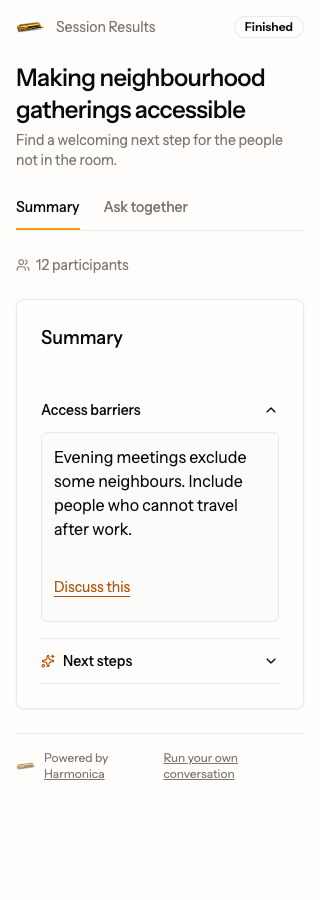
From a finding to a question
- Open a section in Summary. Choose Discuss this under the passage you want to explore.
- In Ask together, read the related questions. Reply to one or choose New question to start a discussion.
- Choose View in summary on a linked question to reread the passage that prompted it.
Build on the questions people leave.
The results give you a starting point. Shared inquiry gives people a way to return, question an interpretation and bring another perspective.
Make room for the next question
The host enables Encountering for an eligible session and separately chooses whether Monica can answer. People with the right access open the results and join Ask together.
Post, reply and ask Monica
Leave a question for the group, build on someone else’s question, or explicitly ask Monica to explore it. Human replies are part of the conversation too.
Return to what is still open
Read the questions and answers when you return. Follow the evidence, consider a different interpretation and decide together what needs another conversation.
Shared inquiry.
Clear boundaries.
Know who you are speaking to
Check the audience before you post. A question in Ask together belongs to that shared space; your existing private conversations stay private.
See what an answer draws on
Monica’s references let you inspect supporting evidence within the session’s access rules. Contributions, interpretation and uncertainty have different roles in understanding the results.
Keep the judgment with people
A suggestion is something to consider. The group decides what to question, what to explore further and what to do next.
Do we need to be online at the same time?
Who can read and join the conversation?
Does this share my private conversation?
Which sessions does Encountering support?
Will Monica answer every question?
How do I get started?
Give the next question somewhere to go.
Bring people into the conversation, then give them a way to explore what the group has learned.